Uniswap v4 hook honeypots: how they work and how to spot one
13 November 2026
A honeypot is a token you can buy but can't sell. The chart goes up, people pile in, and only the person who set it up can get money out. On Uniswap v4 the trap doesn't have to be in the token. It can sit in the pool's hook, where most token checkers don't look.
The short version: paste the token or hook address into UniHooks and open the hook's page. If the grade is D and the safety report says trading can be stopped or shows a sell trap, don't buy.
How a hook honeypot works
A hook is a contract that Uniswap calls on every trade in its pool. One of the things it's allowed to do is refuse a trade. That's how honest launch limits work. It's also all a honeypot needs.
The usual build looks like this:
- Buys always go through. Nothing looks wrong while the price climbs.
- Sells go through a check. The hook looks at a switch or a list before it lets a sell happen.
- Someone can flip the switch. Once it's on, every sell fails.
- Only one party can undo it, or let chosen wallets sell. That party sells into everyone else's buys.
The switch is rarely called what it is. In one kit we found on Ethereum, the function that blocks selling is named like a harmless trading function. The same code was deployed more than a dozen times under different hook names.
Why the old checks miss it
Most safety labels ask simple questions. Is the code published? Is there an owner? Is it a proxy? A honeypot hook can pass all three. Its code is public, nobody is listed as owner, and it can't be upgraded. The trap is in what the code lets someone do, not in a label.
That's why UniHooks grades a hook by what its code allows after you buy. Several of the trap hooks we found would have looked clean on labels alone. Read by what they can do, every one of them is a D.
The five signs
- Trading can be stopped. A pause, a block list, or any setting the hook checks before a sell.
- A block only one party can lift. If anyone can switch selling off but only the deployer can switch it back on, it was built to catch people.
- A tax with no limit. A sell tax that can be set to 100% is a honeypot with extra steps.
- Code that can be replaced. A fair hook today can be a trap tomorrow if someone can swap its code or a contract it depends on.
- Code nobody can read. If the source isn't published, assume the worst.
How to check a hook in under a minute
- Paste the token address or the hook address into the search on UniHooks.
- Open the hook's page and look at the grade box. The small icons show the worst things its code allows. Hover one to see what it means.
- Scroll to the Safety report. The first part, What its code allows, lists each finding in plain words with the function behind it.
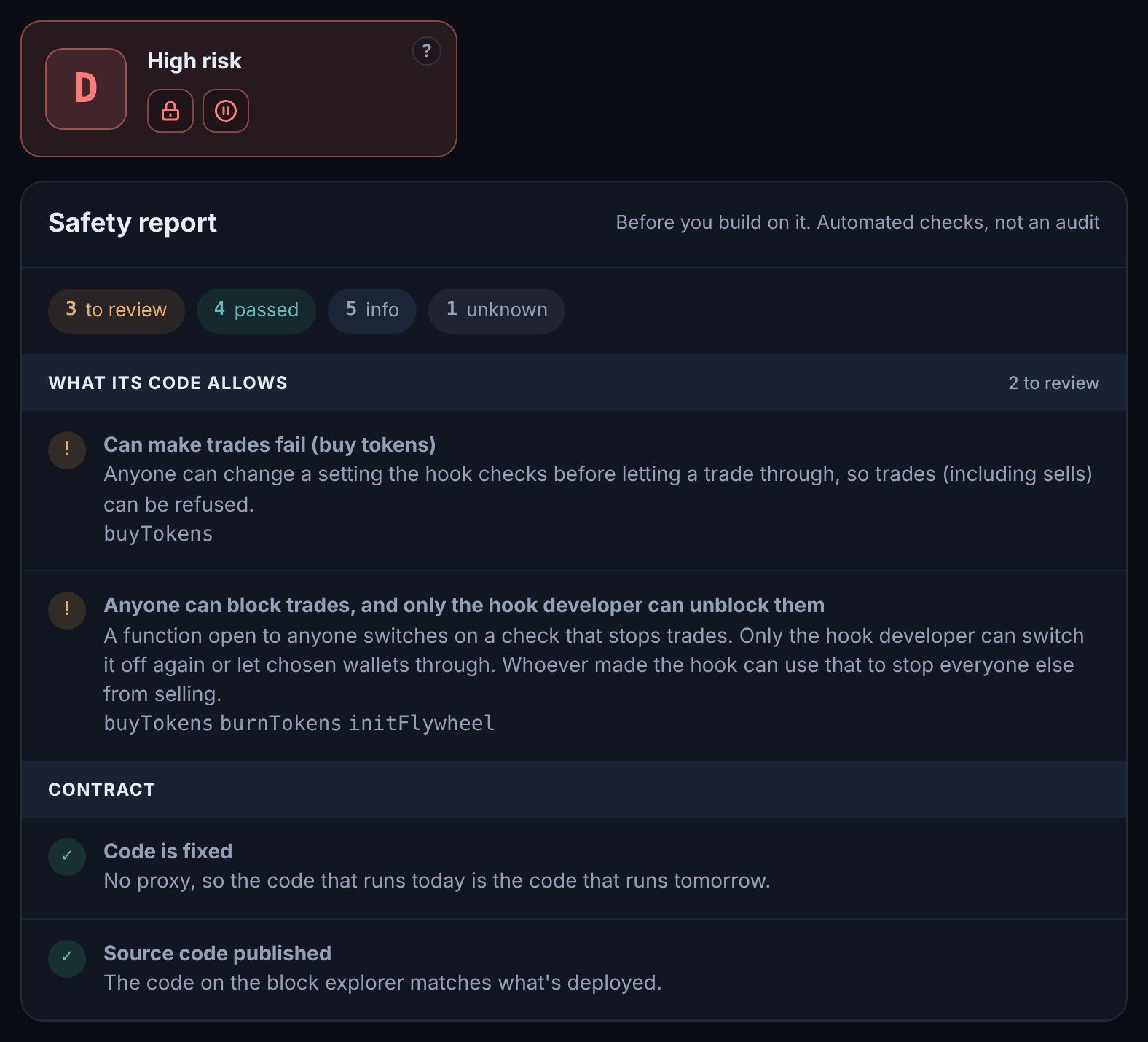
A hook with fixed rules shows a green shield and the line Nobody can change its rules after you buy. A hook like the one above shows red signs and tells you exactly which function does the damage.
What this can't tell you
A clean hook doesn't make a token a good buy. The token contract can have its own traps, the team can still dump, and code can have bugs nobody has found. The grade is a fast first check, not an audit. More on that in how to read a hook's grade and what to check before you buy.